Whether you are an expat living in a high-rise in Riyadh or renting a family apartment in Jeddah, peace of mind is invaluable. You want to be able to keep an eye on your home, check in on your pets while you are at the office, or ensure your domestic workers are safe and doing well.
However, because the vast majority of residents in Saudi Arabia rent their homes, installing traditional heavy-duty CCTV systems is impossible. Landlords will rarely allow you to drill deep holes into concrete walls or run long power cables through the ceilings, and you certainly don’t want to lose your housing deposit.
The solution is the modern, renter-friendly indoor smart camera. These devices require zero drilling, zero professional installation, and run entirely on your apartment’s existing Wi-Fi network.
Here is your guide to securing your KSA apartment and the best plug-and-play smart cameras currently available on Amazon Saudi Arabia.
1. Why Wi-Fi Smart Cameras Are Perfect for Expats
Gone are the days of needing a massive hard drive recording system (NVR) hidden in a closet. Today’s smart cameras are the size of a coffee cup and offer features that traditional systems simply cannot match.
- 100% Damage-Free Installation: These cameras simply plug into a standard wall outlet and sit on a bookshelf, kitchen counter, or TV stand. When your rental contract ends, you simply unplug them and put them in a box.
- Instant Phone Alerts: If the camera detects motion while you are at the office or traveling outside the Kingdom, it sends a 10-second video clip directly to your smartphone.
- Two-Way Audio: Most models feature a built-in microphone and speaker. You can open the app on your phone and speak directly to whoever is in the room—perfect for giving instructions to a delivery driver dropping something off at the door or telling your cat to get off the counter.
2. Key Features to Look For When Buying
Not all smart cameras are created equal. To ensure your camera works reliably on Saudi Wi-Fi networks and provides clear evidence if needed, look for these three features:
- Local MicroSD Storage: While cloud storage is nice, it usually requires a paid monthly subscription in US Dollars. Look for cameras that accept a MicroSD card so your video is stored locally for free.
- 1080p or 2K Resolution: Do not buy 720p cameras. The resolution is too low to read a name badge or see clear facial features from across a living room. 1080p is the minimum standard today.
- Pan and Tilt: If you have a large, open-plan apartment (common in newer KSA buildings), a stationary camera might leave blind spots. A “Pan/Tilt” camera allows you to swipe on your phone screen to physically rotate the camera lens 360 degrees.
3. The Best Renter-Friendly Cameras on Amazon.sa (2026 Picks)
We have analyzed the top-performing indoor cameras available locally, focusing on app reliability, image clarity, and subscription-free storage options.
The Best Overall Value: TP-Link Tapo C200 Pan/Tilt Camera
TP-Link is famous for its Wi-Fi routers, but their Tapo security line is arguably the best budget-friendly option in the world. The C200 records in crisp 1080p, allows you to rotate the lens 360° horizontally from your phone, and has excellent infrared night vision. Best of all, it supports up to 128GB of local MicroSD storage, meaning you never have to pay a monthly fee.
- Best for: Large living rooms, pet owners, and budget-conscious buyers.

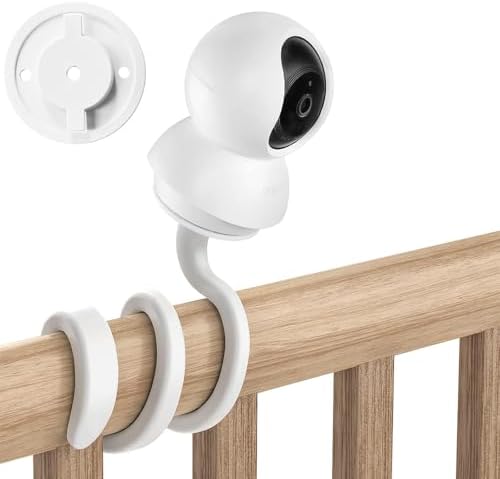

The Premium Ecosystem Choice: Ring Indoor Cam (2nd Gen)
If you already use Amazon Alexa or have a Ring Video Doorbell, the Ring Indoor Cam integrates seamlessly into your existing smart home. It is incredibly small, allowing you to hide it easily among books or decor. The motion detection algorithm is world-class, meaning you won’t get false alerts every time a shadow moves across the wall.
- Best for: Users already in the Amazon Alexa/Ring ecosystem who want a tiny, discreet camera.
- Note: To save video clips to watch later, Ring requires a “Ring Protect” monthly subscription.

- No-Drill Ring Camera Wall Mount: This ring camera wall mount is compatible with Ring Indoor Cam (1st & 2nd Gen), Blink M…
- No Drilling & No Screws Installation: This ring camera mount no drill makes installation simple: just peel the adhesive …
- Sturdy Ring Camera Mount: Our ring camera mount no drill sticks firmly to smooth surfaces, keeping your ring indoor came…

- No-Drill Ring Camera Wall Mount: This ring camera wall mount is compatible with Ring Indoor Cam (1st & 2nd Gen), Blink M…
- No Drilling & No Screws Installation: This ring camera mount no drill makes installation simple: just peel the adhesive …
- Sturdy Ring Camera Mount: Our ring camera mount no drill sticks firmly to smooth surfaces, keeping your ring indoor came…
- No-Drill Ring Camera Wall Mount: This ring camera wall mount is compatible with Ring Indoor Cam (1st & 2nd Gen), Blink M…
- No Drilling & No Screws Installation: This ring camera mount no drill makes installation simple: just peel the adhesive …
- Sturdy Ring Camera Mount: Our ring camera mount no drill sticks firmly to smooth surfaces, keeping your ring indoor came…
The “No Monthly Fees” Powerhouse: Eufy Security Solo IndoorCam C24
Eufy has built its entire brand around “Security, No Strings Attached.” This camera boasts an incredible 2K resolution (significantly sharper than 1080p), providing crystal clear zoom capabilities. It features built-in human and pet AI, meaning it knows the difference between a person walking in and a curtain blowing in the AC breeze. It relies entirely on local SD card storage or Apple HomeKit Secure Video.
- Best for: Privacy-focused users who want maximum resolution without paying any monthly cloud fees.


4. Where to Place Your Cameras in a Saudi Apartment
To get the most out of your new smart cameras without violating the privacy of your guests or workers, follow these placement rules:
- The Entryway Checkpoint: Place one camera on a console table pointing directly at the front door. This is the single most important choke point in any apartment.
- The High-Angle View: Place the camera as high as possible (like on top of a bookshelf). This prevents the camera from being easily knocked over and gives the lens a wider field of view.
- Avoid Pointing at Windows: If you point a camera directly at a bright window overlooking the street, the sunlight will “wash out” the sensor, making anything inside the room look like a dark silhouette. Angle it away from direct exterior light.
Frequently Asked Questions (FAQs)
No. These indoor cameras require a constant power connection from a wall outlet. If the SEC power grid goes down in your neighborhood, the camera will turn off until the power is restored.
Absolutely. This is the biggest benefit of plug-and-play cameras. You just unplug them, take them to your new apartment, plug them into the wall, and update the Wi-Fi password in the app.
Yes, it is perfectly legal to use indoor security cameras inside your own private rented residence for personal security. However, it is a strict violation of privacy laws in Saudi Arabia to point cameras out of your windows at neighboring apartments, into public spaces, or into private areas like bathrooms.
Conclusion
Securing your rented apartment in Saudi Arabia does not require expensive tools, a drilling permit from your landlord, or a complicated setup. By spending between SAR 100 and SAR 250 on a plug-and-play Wi-Fi camera, you can monitor your home from anywhere in the world and enjoy total peace of mind.
Are you leaving your apartment empty for the summer while you travel home? Make sure you aren’t wasting money while you are gone. Read our guide on How to Cut Your Saudi Summer Electricity Bill in Half with a Smart AC Controller to cut your bills in half.)